Features
Everything between your data and your next decision.
From messy exports to clear recommendations, in one place. This is what Ad Intel does today. New here? Read the FAQ or see what a free ad account check tells you.
Bring your data together
Get clean, trustworthy numbers from whatever your ad platforms give you.
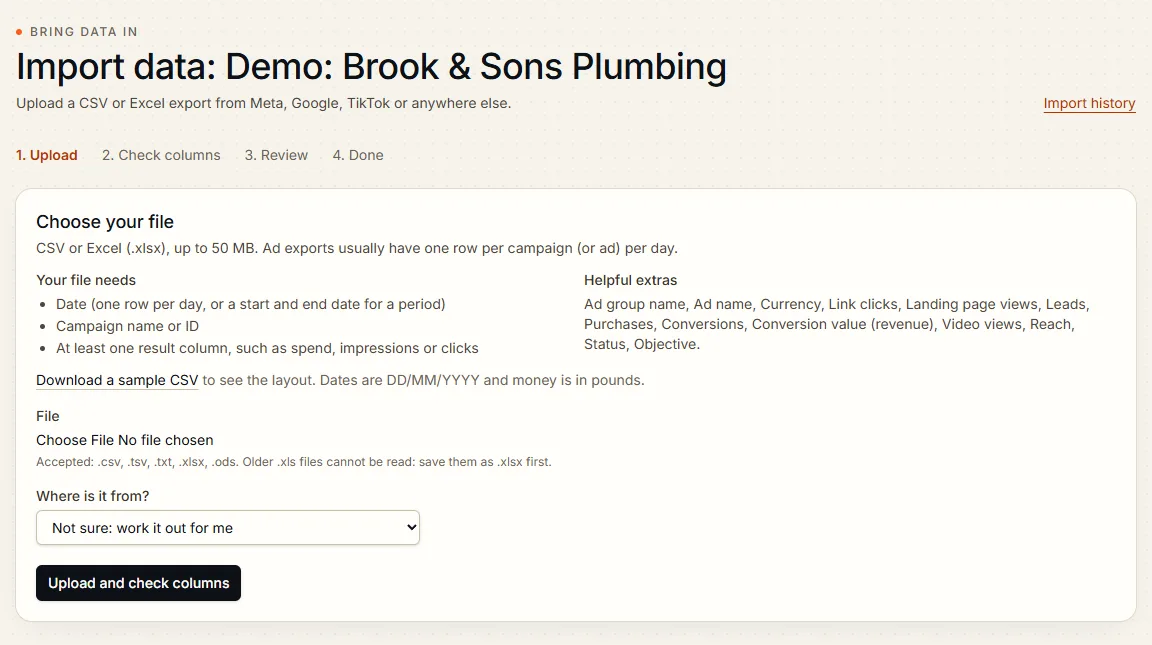
- Direct platform connections
- Connect Google Ads, Meta, TikTok, LinkedIn and Microsoft Advertising to read your figures without exports. Each connection goes live once the platform approves our app, and imports work in the meantime.
- Guided import
- CSV and Excel exports from Google Ads, Meta and more. Columns are matched automatically and remembered for next time. A sample file and the list of required columns are on the upload step, any problem rows are listed with what was expected and what was found, and a whole import can be undone.
- Data quality checks
- Duplicates, gaps, odd currencies and impossible figures are flagged with a quality score before they reach a report. Try it on your own export with the free ad account check.
- Clean history
- Renamed campaigns keep their history. Overlapping uploads are handled safely, so nothing is counted twice.
- Google Sheets import
- Keep your figures in a Google Sheet shared by link and Ad Intel pulls them on a schedule, through the same checks as an upload. A scheduled pull goes all the way in only when the columns are already matched; otherwise it waits for you.
Understand performance
One set of figures, from the whole account down to a single ad.
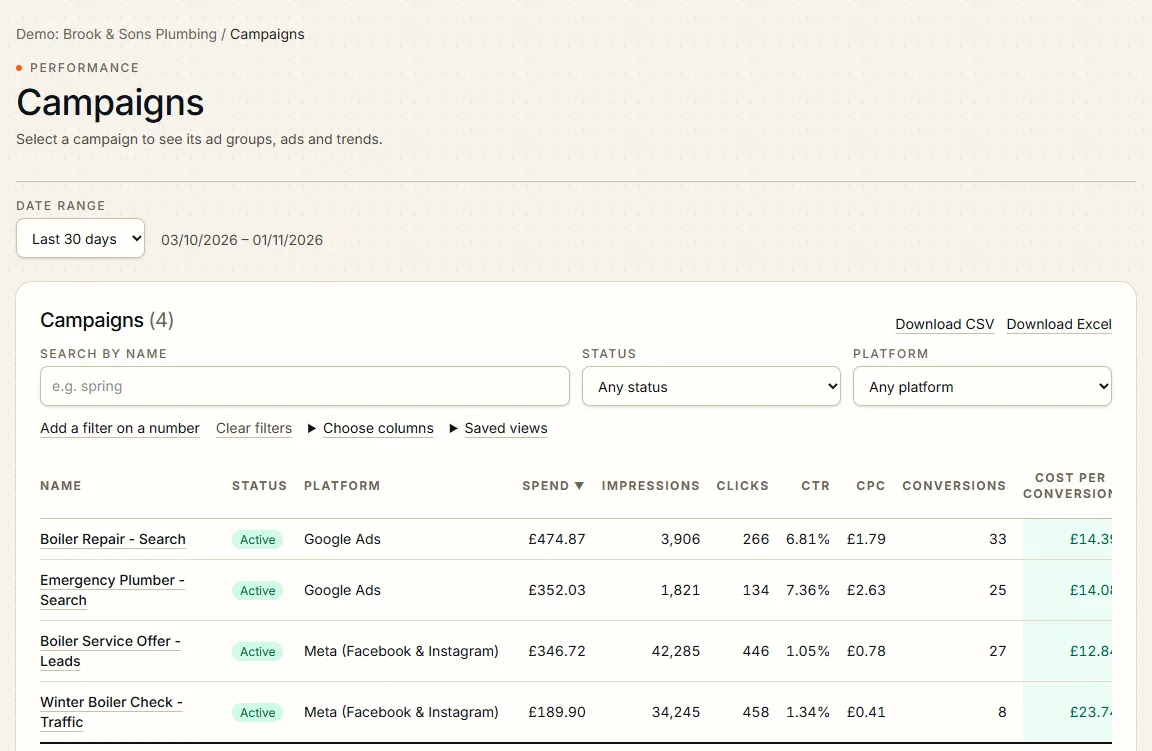
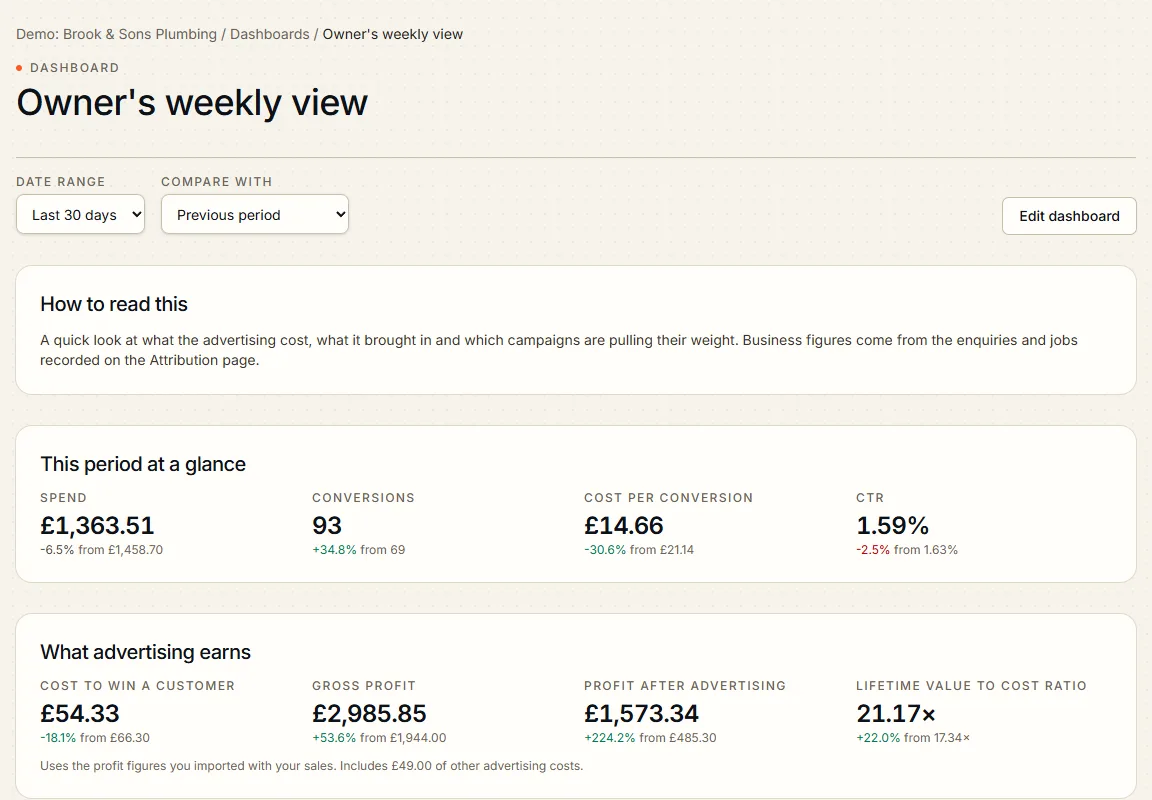
- Overview dashboards
- Spend, results, cost per result and return, compared with the previous period. Pick a preset or custom date range, view any chart as a table, and add notes to a chart to mark what you changed.
- Drill-down reporting
- Account to campaign to ad group to ad, with sortable tables, saved views and safe exports.
- Funnel analysis
- See where people drop off between impression and customer, with a plain-English diagnosis.
- What changed, and why
- Break a movement in cost or results into the factors that caused it.
- All platforms side by side
- Compare Google, Meta, TikTok and the rest on one screen, using each platform's own results or your own leads and sales, never mixed in one row.
- Business figures
- Cost to win a customer, profit after advertising, break-even return and lifetime value against cost. These need your sales or lead data, and any figure that cannot be worked out says what is missing.
Know what to do
Advice grounded in your figures, with the evidence beside it.
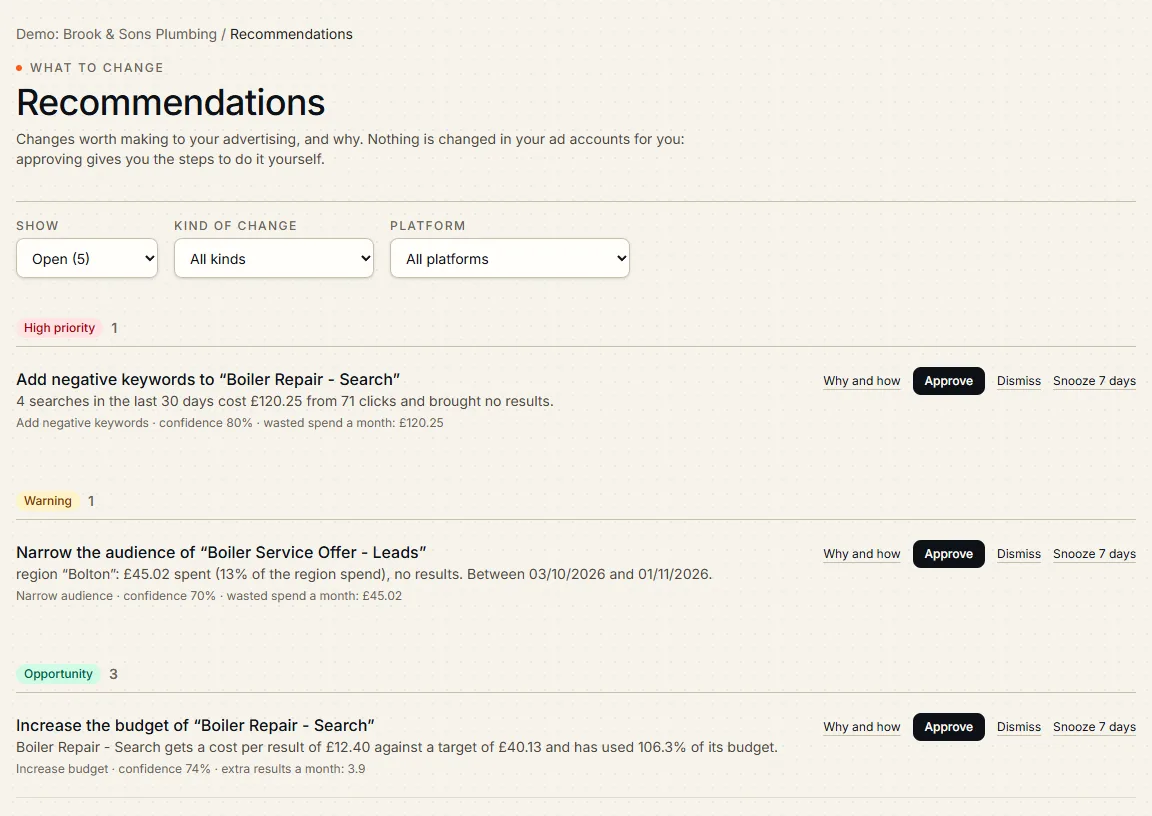
- Recommendations
- Clear suggestions with the reason, the evidence and the steps. Approve, dismiss or snooze, assign one to a colleague, comment on it, and see afterwards whether a change helped.
- AI review
- A short written review of the period. Every figure it states is checked against your data, and anything unsupported is removed.
- Ask in plain English
- Chat with your data. The AI can only read your figures, never change them, and each answer links to its source. You can mark an answer helpful or not, so poor ones get reviewed.
- Today's priorities
- A short morning list of what most deserves attention across recommendations, alerts, pacing, stalled syncs and approvals waiting. The order is set by rules; the wording is checked against your figures.
- Experiments
- Compare two campaigns, ad sets or ads over set dates. Click-through and conversion rates get a significance test; cost figures are shown side by side without a claim.
- Wasted search terms
- On Google Ads, searches that cost money and never produced a result become a suggested list of negative keywords for you to add yourself.
Stay ahead of problems
Hear about it early, in the place you already work.
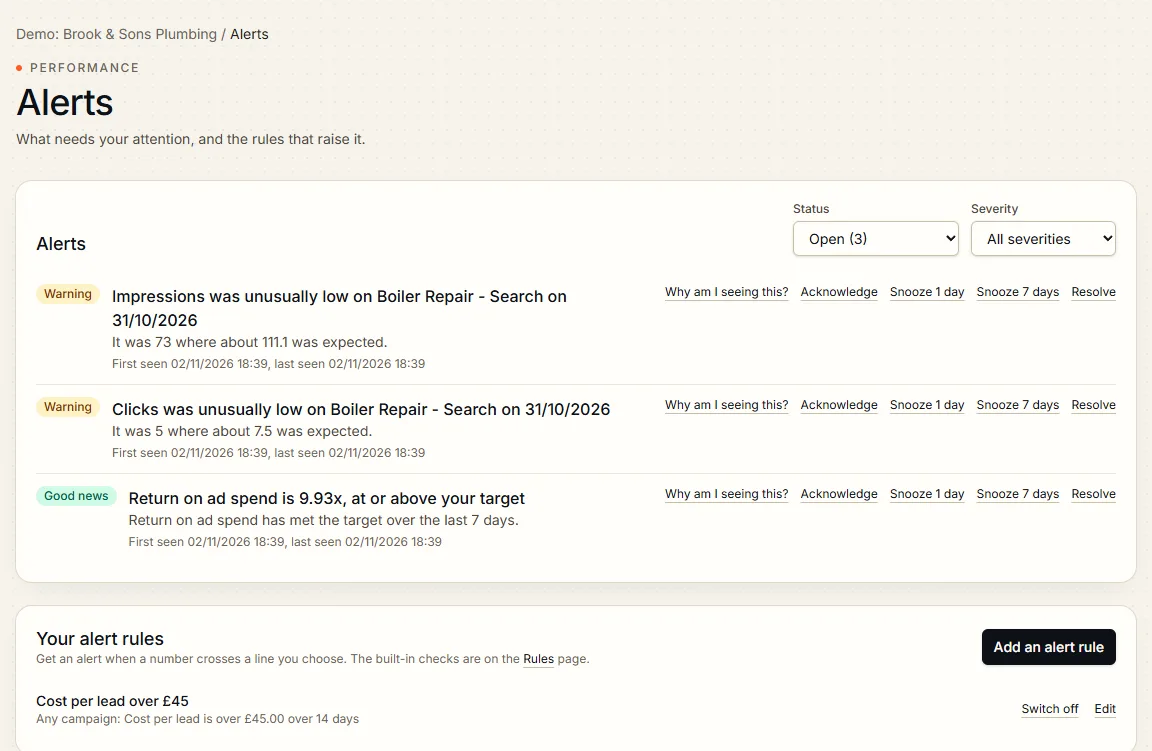
- Anomaly detection
- Sudden changes in spend, clicks or conversions are picked up as they happen.
- Rules, alerts and health score
- Built-in rules for wasted spend, pacing and tracking gaps, your own alert rules with thresholds you choose, and a health page with one score out of 100 per campaign and the reasons behind it.
- Notifications
- In the app, by email, or into Slack and Microsoft Teams. Quiet hours and digests keep it calm.
- Budget pacing and forecast
- See spend so far this month, a forecast of where it will finish, and whether you are on track against budget. The forecast allows for quieter and busier days of the week.
- Industry guides to compare with
- Pick your type of business and Ad Intel shows indicative UK small-business guides for click-through rate, cost per click, cost per lead and click-to-lead rate, for Google and Meta, next to your own figures. The funnel page uses them to show which step is weakest. They are rough guides, not measured market data, so use them as a sense check rather than a target.
- Bank holidays on your charts
- UK bank holidays for your nation are marked on trend charts, so a quiet Monday is not mistaken for a problem.
- Weather on your charts
- Heavy rain (10 mm or more in a day), hot spells, hard frosts and gales at your base location are marked on your trend charts, and a seasonality page shows how your results differ after heavy rain. It matters for weather-sensitive trades and shops, such as boiler repair in a cold snap, roofing and gutters after a storm, garden and outdoor products, and takeaway or events. It tells you whether a quiet or busy week was the weather, not the ads. It shows a pattern, not proof of cause, and holds back when there is too little data.
- Monday summary and app
- A Monday email comparing last week with the week before, and the few things worth doing. Install Ad Intel on your phone or desktop and switch on browser alerts if you want them.
Report and share
Reports your clients and colleagues will actually read.
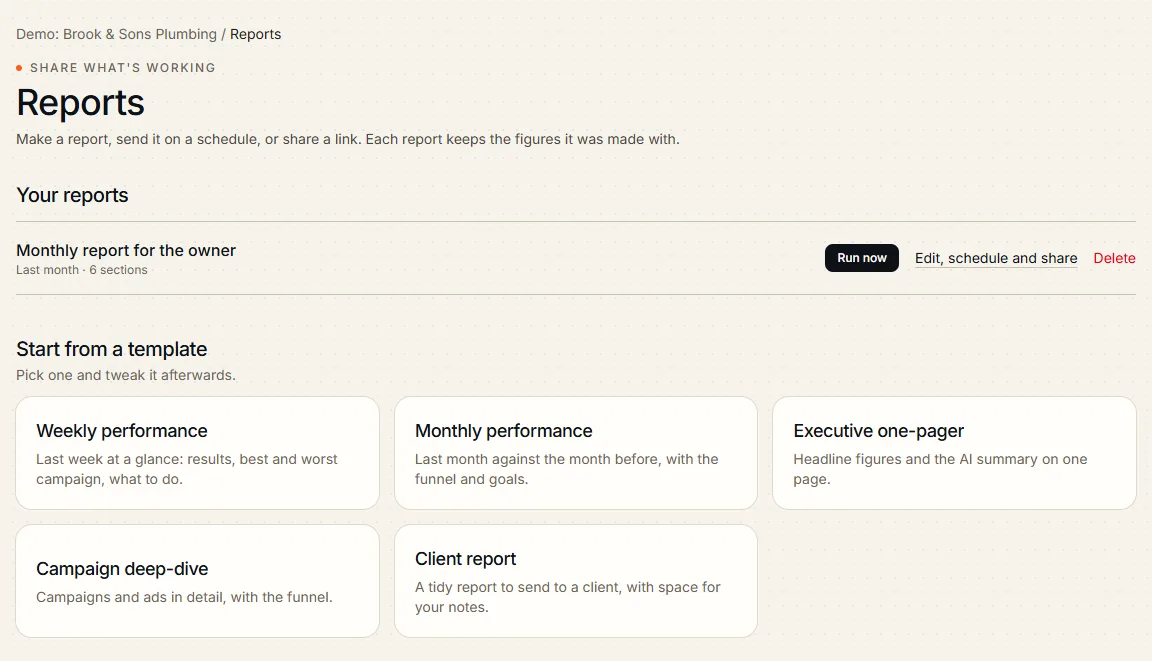
- Report builder
- Start from a template, choose and order the sections, add the figures you pick or a day-by-day trend, and make a report in a click. Download it as a PDF.
- Schedules
- Daily, weekly, monthly or quarterly, in your timezone, emailed to your team and clients.
- Private share links
- Send a link that expires, can be password protected and can be switched off. Figures are frozen when the report is made.
Built for teams and agencies
Control who sees what, with a record of every change.
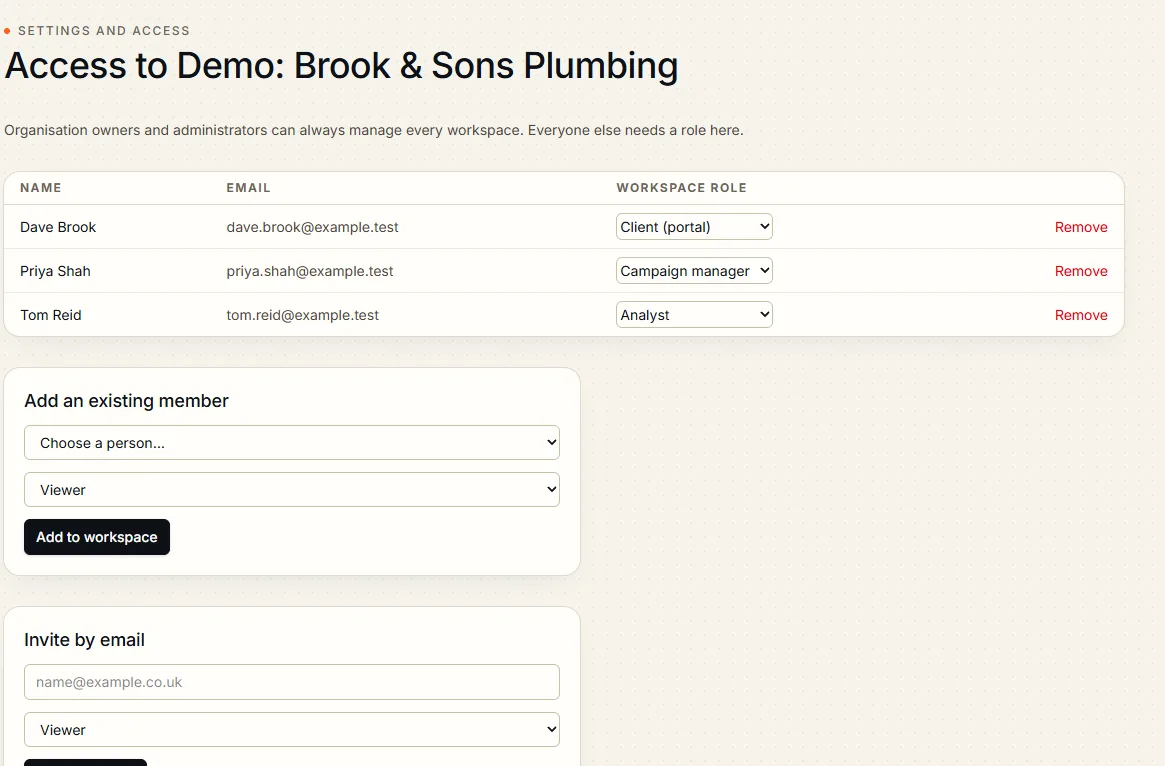
- Workspaces and roles
- Separate workspaces per business or client, with roles that control who can view, edit or import. Invite people by email and they create their account from the invitation.
- Audit trail
- Every change is recorded in a tamper-evident log.
- Secure by default
- Two-factor sign-in, a list of your signed-in devices with sign out everywhere else, and strict separation between organisations. See how personal data is handled in the privacy policy.
- Any currency
- Work in your own currency, with conversion where accounts differ.
- Your data, your control
- Download your data, ask for your account to be deleted, and find and delete one person's records by email or phone number. Contact details are matched by a hash, so they are never searched or kept in the clear. Anyone, with or without an account, can make a data request on the website.
- Status page
- See whether Ad Intel is running normally on the public status page, without signing in.
- Help centre and assistant
- A user guide for signed-in users, and an assistant that answers how-to and billing questions. It cannot see your ad data or change anything. New users get a short tour on first sign-in, a getting-started checklist and a welcome email, and the tour can be replayed from the help page.
Creative and compliance
Find out which ads work, and write new ones that stay within the rules.
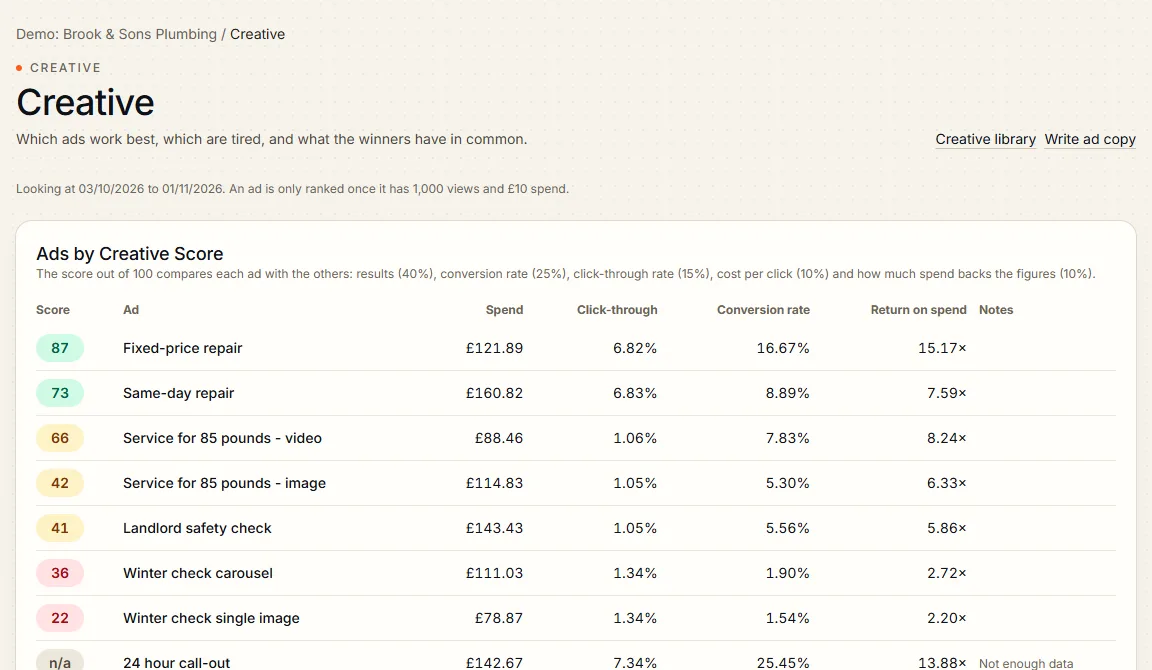
- Creative analysis
- See which images, headlines and offers earn results, which ads are tiring, and what the winners have in common.
- Ad copy generator
- Draft ad copy from your business profile and best performers, and keep the good ones in a creative library.
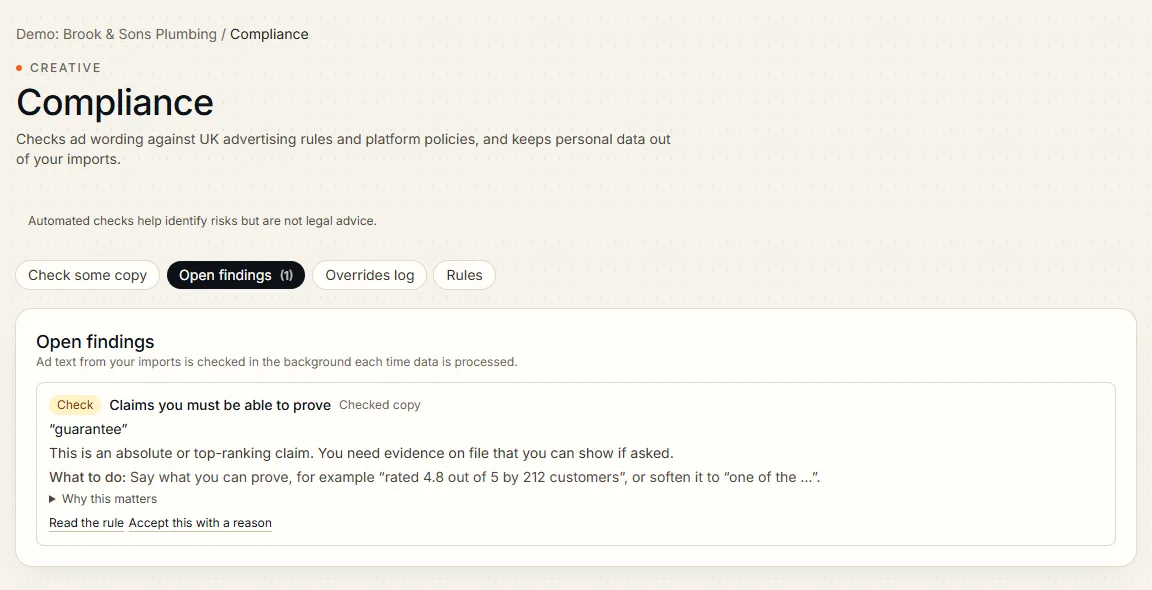
- Compliance checks
- Ad copy is checked against platform and advertising rules before you use it, with the reason for each flag.
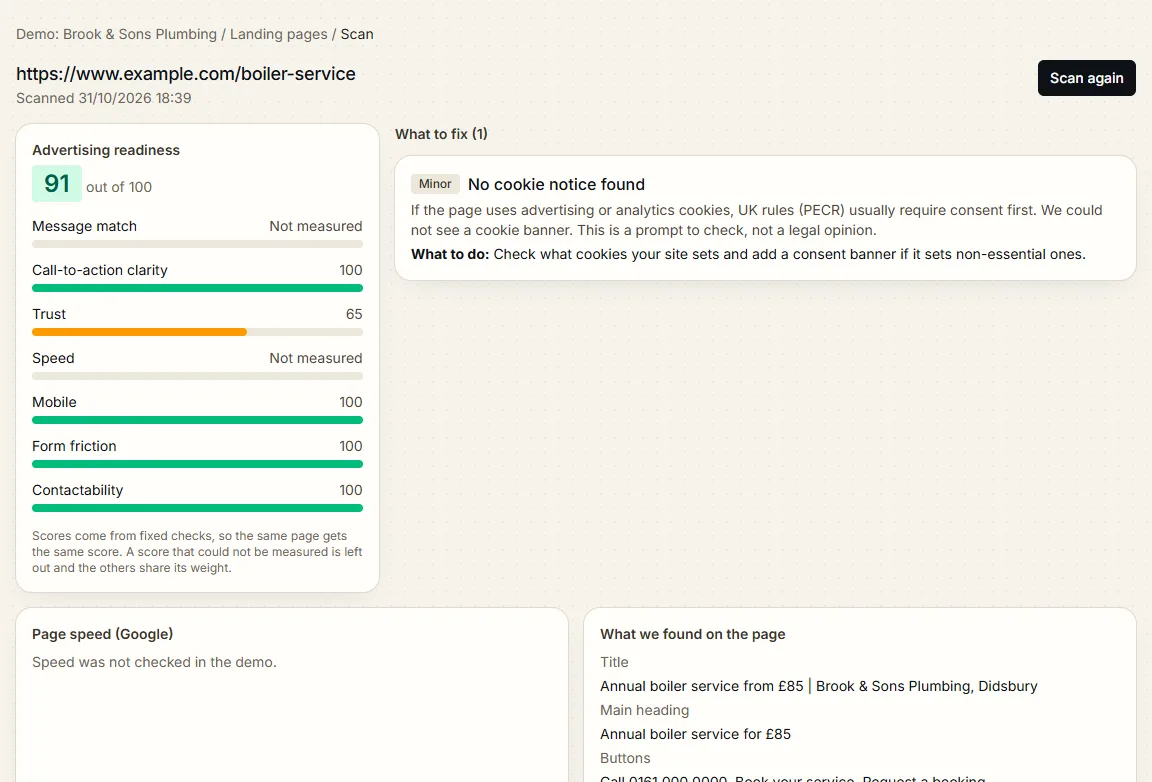
- Landing page checks
- Check the page your ads send people to, so a good ad is not wasted on a weak page. Switch on weekly watching and you are alerted when a form, phone number, price or score changes.
- Video hook and hold rates
- For Meta video ads, see how many impressions become views (hook) and how many viewers watch on (hold), so you know which openings work.
- Campaign drafts
- Write a Meta campaign in Ad Intel, have it checked against the advertising rules and approved, then create it paused in your ad account. It needs a connected Meta account, so it is available once Meta approves our app.
Track what comes from where
Know which ad produced the lead or the sale.
- Tracking links and QR codes
- Build consistent UTM links and campaign names, and make QR codes for print and in-person campaigns.
- Short links with click counts
- Give a tracking link a short address and see clicks over the last 30 days. Clicks record only the time, the referring site and the device type, with no address or cookie.
- Naming conventions
- Save a pattern for campaign names. Links and names that break it are warned about or refused, as you choose.
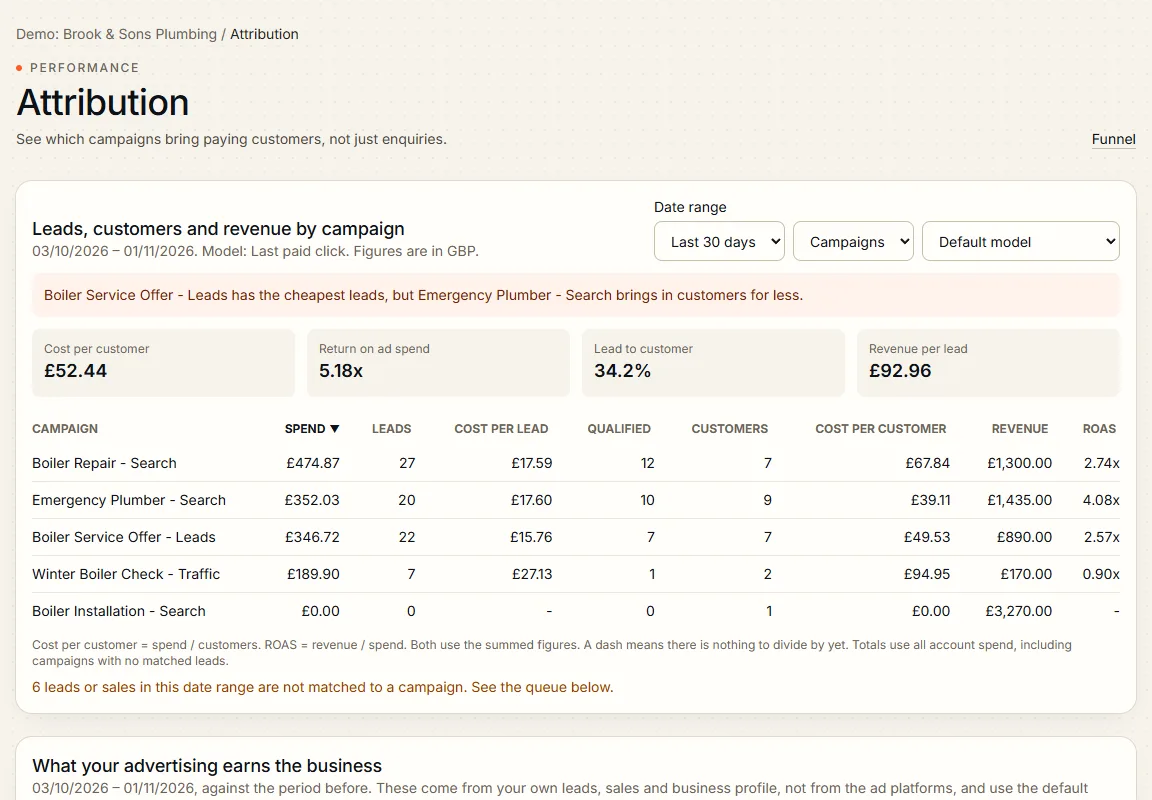
- Lead and revenue attribution
- Connect leads and sales from your CRM, revenue sources or an upload to the ads that brought them in.
- Google Analytics 4
- Bring in website behaviour from GA4 alongside your ad figures.
- Website tracking tag
- An optional small script for your own site that counts visits and results without cookies or storage. It honours Do Not Track and can wait for consent.
- Conversion sending
- Send conversions back to Meta and Google, so their systems learn from your real results. This needs a connected ad account, so it goes live as each platform approves our app.
Automate with control
Let the routine work run itself, with you in charge.
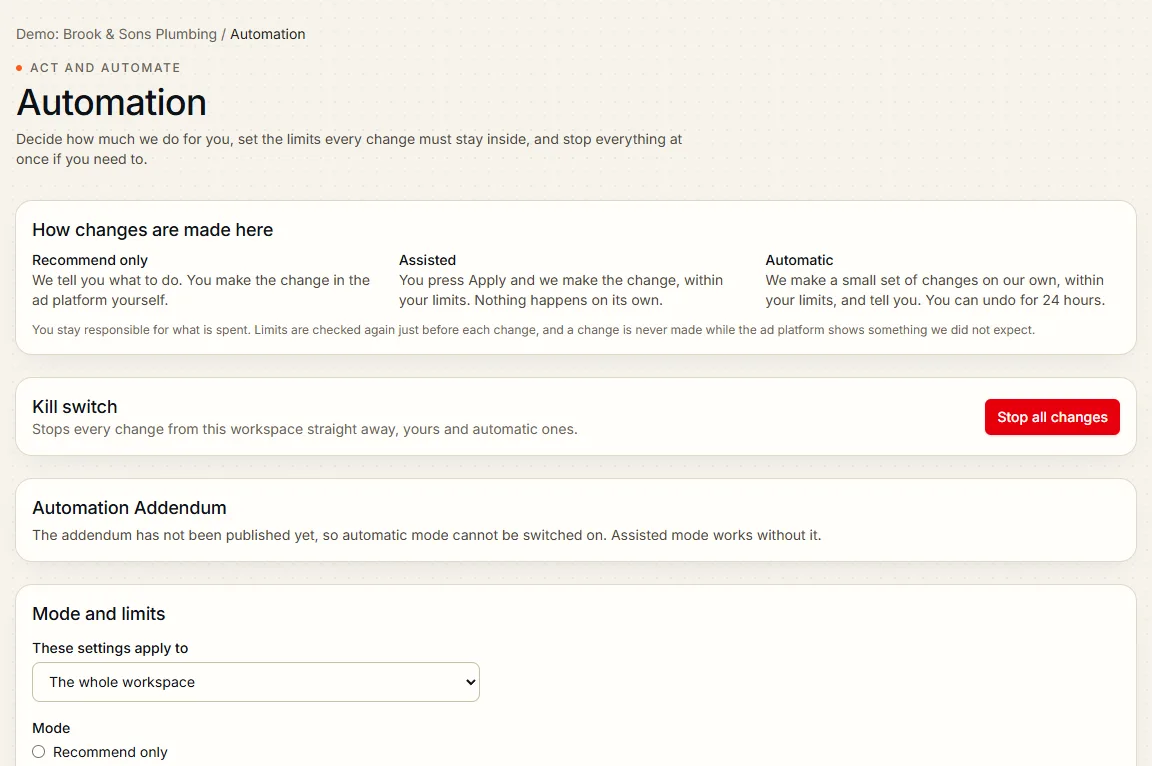
- Approve before anything changes
- Every suggested change to an ad account waits for approval, is checked against safety limits and can be undone where the platform allows.
- Guarded automation
- Switch on rules for pausing wasted spend or adjusting budgets, inside limits you set. Every action is recorded.
- Budget optimiser
- Ask where an extra amount should go, or how to move budget between campaigns for more results at the same total. These are estimates from each campaign's own history, and you make the change yourself.
- AI Advertising Manager
- An assistant that reviews your accounts, proposes changes and explains why. It works from your figures and cannot act without your approval.
- Works with your own AI tools
- Connect an AI assistant that supports MCP, with read access to your figures and the same permissions as you.
Connect and build
Fit Ad Intel into the tools you already use.
- Public API and webhooks
- Read your figures with an API key, and get webhooks when something happens.
- CRM and revenue connectors
- Bring in leads and revenue from HubSpot, Shopify and Stripe.
- Custom dashboards
- Build dashboards from the cards that matter to you: add, remove and reorder key figures, trend charts, campaign tables and text, and use them in reports.
- Refer and earn
- Join the referral programme from the Refer and earn page in the app, share your personal link, and earn commission when a business you refer signs up and pays. Commission is held for a short period in case of refunds, then paid by bank transfer. Read the referral programme terms before you join.
- Age, gender, placement and region
- Import breakdowns and see where results come from, with recommendations that use them.
Agencies and white label
Run many clients from one place, under your own name.
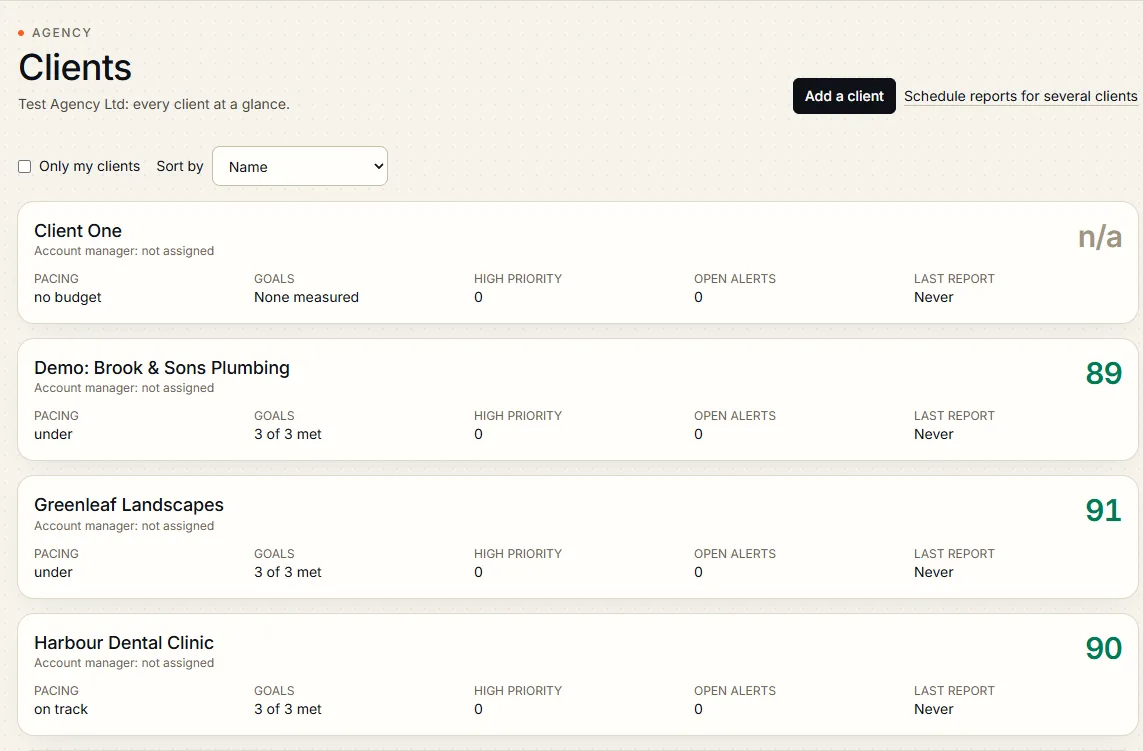
- Agency mode
- A workspace for every client, a portfolio view showing health, pacing and goals across your clients, and a lead and support account manager for each. Extra client workspaces when you grow.
- Client portal
- Give clients their own view of their reports and results, with no access to anything else. You choose which custom dashboards a client can see, by ticking "Share with clients" on each one, and the rest stay private. Clients can approve a request or decline it with a reason.
- Approvals inbox
- Requests waiting for a decision are in one place, with reminders at 24 and 48 hours and a record of who decided.
- Fees and bulk reports
- Record management fees and other costs so reports can show the full cost of advertising, and put one report on a schedule for many clients at once.
- White label and custom domains
- Use your own logo, colours and domain on the portal and reports.
- Guided client onboarding
- Set up a new client with their goals and data in a few steps.
Connections awaiting approval
Direct connections to Google Ads, Meta, TikTok, LinkedIn and Microsoft Advertising are built and are waiting for each platform to approve our app. Until then, bring your data in by CSV or Excel import and everything above works the same way.
Questions about plans or your data? Read the FAQ or contact the team.
Start free trial Try the demo